 Spiritual6,008 copies
 142 copies
Mafia · Free image prompt
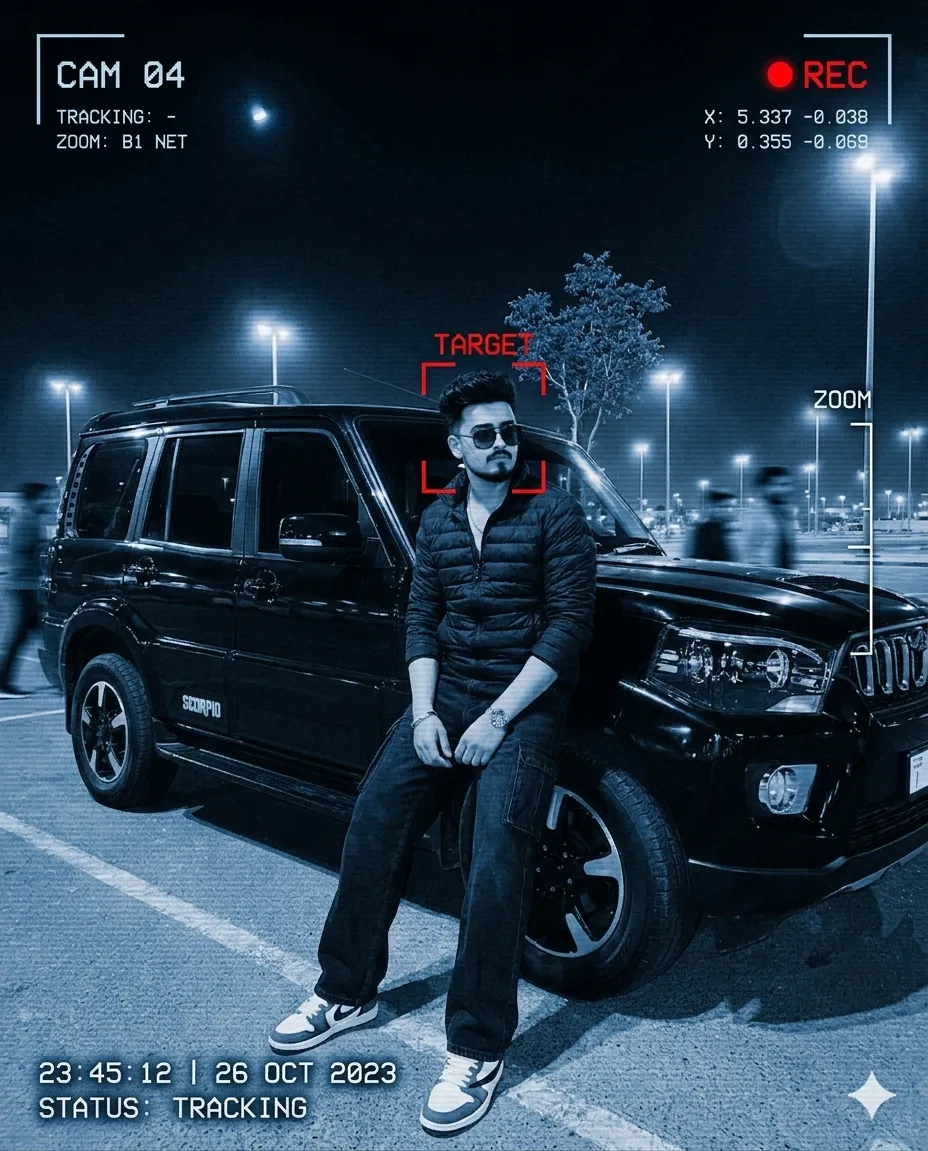
Spy Camera Surveillance Portrait Edit
Make this look your own. Copy the full prompt and follow the guide below.
The prompt
Read the guideTransform the uploaded photo into a hyper-realistic covert surveillance capture from a high-budget thriller film. Preserve the subject’s exact facial identity, hairstyle, clothing, body shape, pose, and overall environment so the original composition remains recognizable.
Apply an authentic cold-blue security camera treatment with deep contrast, subtle digital noise, horizontal scanlines, compression artifacts, soft motion blur in the surroundings, and realistic low-light shadows. The subject must remain crystal clear and sharply focused while the nearby crowd appears naturally blurred from movement, creating the feeling of live monitoring footage.
Overlay advanced tactical tracking graphics across the frame, including a glowing red subject-detection rectangle, live recording symbol, camera feed labels, timestamp data, zoom percentage, coordinate markers, signal indicators, and a subtle “TRACK LOCK ACTIVE” system message. Add cinematic HUD-style interface elements inspired by intelligence agency monitoring systems without making them overly futuristic.
Keep lighting physically realistic with detailed skin texture, believable reflections, natural depth, and accurate perspective. The final image should feel like a leaked classified surveillance still captured from a hidden long-range monitoring camera during a tense espionage sequence.
Visual Style:
Photorealistic, cinematic spy-thriller atmosphere, moody shadows, high-detail textures, realistic color grading, immersive CCTV aesthetic, dramatic yet believable surveillance look.
No sign-up needed. You can also select and copy the text manually.
More inspiration for you
View all →
SponsoredAd
The creator's guide
How to use Spy Camera Surveillance Portrait Edit
Use “Spy Camera Surveillance Portrait Edit” as a starting point for your Mafia creation. The guide below highlights instructions from this specific prompt and shows what to change when adapting it to your own idea.
01
Get ready
Start with a clear reference photo. Upload it to an AI tool that accepts images before pasting the prompt. Choose a well-lit image with the subject unobstructed.
02
Copy & create
Copy the complete prompt above, paste it into your AI tool, and generate a first version. Keep the original instructions for your first attempt.
03
Refine one detail
Check the eyes, hands, skin texture, and likeness first. If the face changes too much, ask to preserve the reference identity and remove conflicting appearance instructions.
Inside this prompt
Lighting
Keep lighting physically realistic with detailed skin texture, believable reflections, natural depth, and accurate perspective
Composition
Preserve the subject’s exact facial identity, hairstyle, clothing, body shape, pose, and overall environment so the original composition remains recognizable
Style
Transform the uploaded photo into a hyper-realistic covert surveillance capture from a high-budget thriller film
Three variations to try
Try one follow-up at a time after generating your first result.
Change the mood
Keep the subject and composition. Replace the lighting with soft natural window light and a calm, muted palette.
Make it your own
Keep the visual style. Replace the setting with a location of your choice and remove any details that conflict with the new scene.
Adapt the framing
Keep the face and identity consistent. Leave extra space around the head and shoulders for a square profile-picture crop.
If your result looks different
The preview is a visual reference, not a guaranteed output. Results vary by model, settings, and reference image. Keep the instructions that matter most, remove contradictions, and change one detail between attempts.