 Spiritual6,007 copies
 4,116 copies
Spiritual · Free image prompt
Krishna Mural Portrait Prompt
Make this look your own. Copy the full prompt and follow the guide below.
The prompt
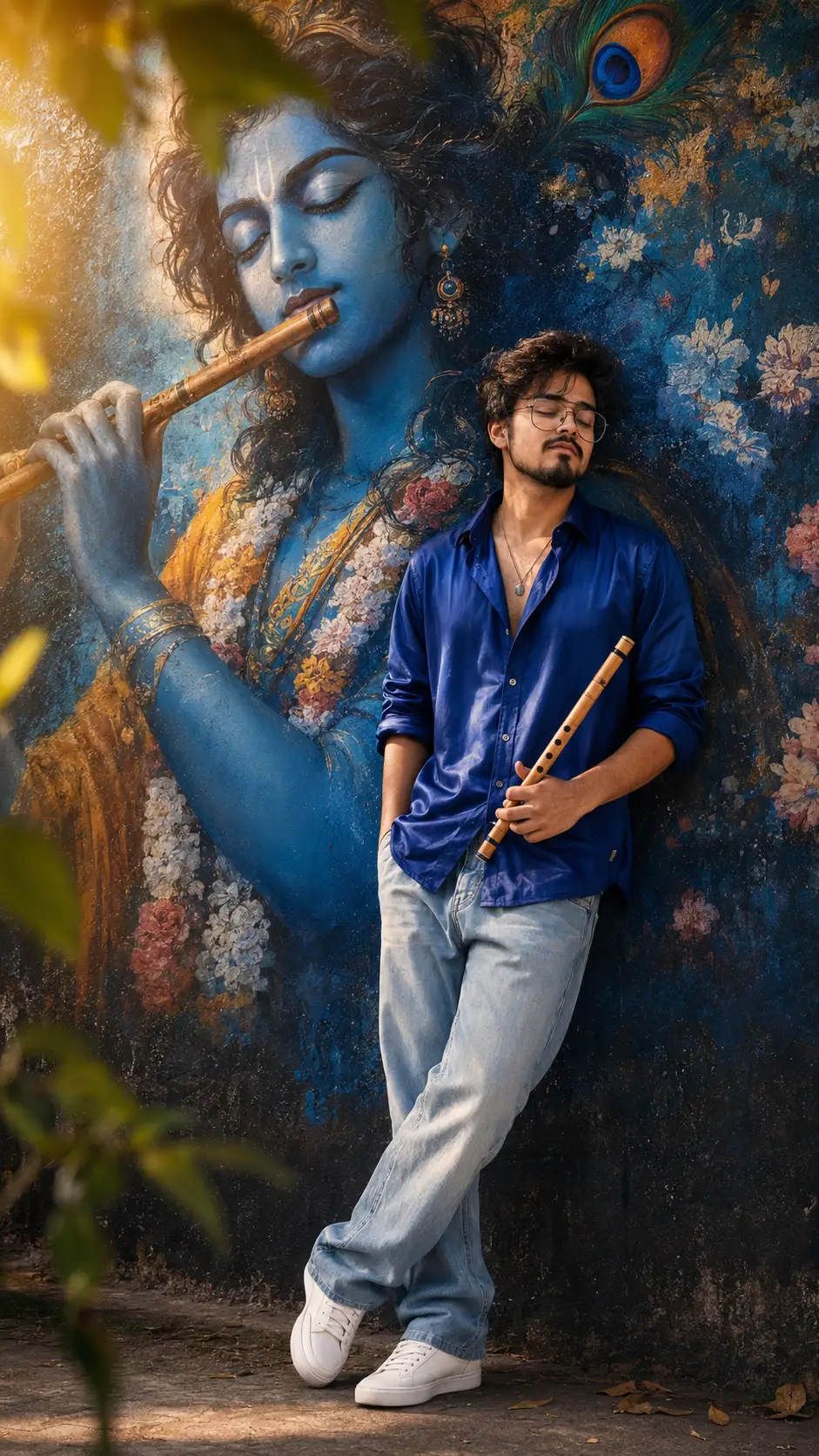
Read the guideUltra-realistic cinematic full-body portrait of a handsome young South Asian man standing peacefully with eyes closed and a soft relaxed smile, gently holding a wooden flute in one hand while leaning calmly against a dark textured artistic wall beside a gigantic vibrant mural of Lord Krishna playing flute. Massive Krishna artwork painted in rich royal-blue tones with glowing peacock feather details, dreamy floral textures, luminous divine aura, spiritual cinematic atmosphere filling the background.
The subject has slightly long messy relaxed hair with natural soft movement, a calm attractive face with peaceful devotional emotion, sharp yet soft masculine features, smooth glowing fair skin tone with healthy natural radiance, bright clean complexion, subtle glossy skin highlights, and a relaxed serene expression. Face softly resting against the wall naturally with calm energy and emotional stillness, head slightly tilted toward the wall in a peaceful sleep-like relaxed pose.
Body physique is healthy, aesthetic, and well-built with broader shoulders, fuller arms, stronger chest structure, balanced muscular body shape, athletic masculine proportions, and a slightly bulky fashionable physique — clearly not slim, not overly muscular, but strong, attractive, premium-model body proportions.
Subject wearing an oversized luxurious deep royal-blue satin button-down shirt with rich glossy fabric shine and elegant folds, loose light-wash baggy jeans, and clean white sneakers. Pose styled in a relaxed editorial aesthetic with the LEFT leg casually crossed over the RIGHT leg naturally at the ankle and lower shin area, where both legs stay fully connected and touching naturally along the crossed section — not just the toes or front edge touching. The crossed LEFT foot rests completely and naturally against the RIGHT foot area with full relaxed contact, creating a realistic calm fashion pose. Both feet remain grounded naturally without touching the wall, mural, or sacred artwork area. The crossed leg position stays toward the outer side away from Krishna mural, maintaining respectful spacing from the artwork. Elegant relaxed body balance with peaceful devotional energy and calm street-style confidence.
Warm golden daylight mixing beautifully with dramatic royal-blue ambient glow, cinematic halo backlight around the subject and Krishna mural, teal-orange cinematic grading, dreamy sun flares, floating bokeh leaves, nostalgic grainy 90s film texture, luxury editorial Indian street-art photography vibe, emotional devotional atmosphere, ultra detailed DSLR realism, photorealistic skin texture, shallow depth of field, HDR lighting, masterpiece composition, colorful high-contrast tones, luxury cinematic photography aesthetic, vertical 9:16 ratio.
No sign-up needed. You can also select and copy the text manually.
More inspiration for you
View all →

SponsoredAd
The creator's guide
How to use Krishna Mural Portrait Prompt
Use “Krishna Mural Portrait Prompt” as a starting point for your Spiritual creation. The guide below highlights instructions from this specific prompt and shows what to change when adapting it to your own idea.
01
Get ready
Open an AI tool that supports the output you want. Start a new conversation so earlier instructions do not change the result.
02
Copy & create
Copy the complete prompt above, paste it into your AI tool, and generate a first version. Keep the original instructions for your first attempt.
03
Refine one detail
Check the eyes, hands, skin texture, and likeness first. If the face changes too much, ask to preserve the reference identity and remove conflicting appearance instructions.
Inside this prompt
Lighting
Warm golden daylight mixing beautifully with dramatic royal-blue ambient glow, cinematic halo backlight around the subject and Krishna mural, teal-orange cinematic grading, dreamy sun flares, floating bokeh leaves, nostalgic grainy 90s f…
Composition
Warm golden daylight mixing beautifully with dramatic royal-blue ambient glow, cinematic halo backlight around the subject and Krishna mural, teal-orange cinematic grading, dreamy sun flares, floating bokeh leaves, nostalgic grainy 90s f…
Style
Ultra-realistic cinematic full-body portrait of a handsome young South Asian man standing peacefully with eyes closed and a soft relaxed smile, gently holding a wooden flute in one hand while leaning calmly against a dark textured artist…
Three variations to try
Try one follow-up at a time after generating your first result.
Change the mood
Keep the subject and composition. Replace the lighting with soft natural window light and a calm, muted palette.
Make it your own
Keep the visual style. Replace the setting with a location of your choice and remove any details that conflict with the new scene.
Adapt the framing
Keep the face and identity consistent. Leave extra space around the head and shoulders for a square profile-picture crop.
If your result looks different
The preview is a visual reference, not a guaranteed output. Results vary by model, settings, and reference image. Keep the instructions that matter most, remove contradictions, and change one detail between attempts.